As an educator I think that it is my responsibility to aid my students in becoming digitally literate. We live in a digital world and teaching my students how to use the technology available to them is very important. I plan on incorporating technology in my classroom and having my students use technology to complete certain tasks and assignments.
I plan on teaching third grade and I think it is very important for my students to master all of the basic computer skills but especially how to do research and search the internet to gather information while using safe internet practices. That is something that I would specifically like to teach my students and it's a skill i know will be useful for them. In third grade they are old enough to use the internet. Being familiar with the internet and safe websites and search engines is important because it will help them complete projects in my class and definitely in the future.
http://pages.gseis.ucla.edu/faculty/bates/articles/Ed_Internet_Kafai-h_960624.html
In my classroom I plan on incorporating internet searches into my lessons. I would give my students a specific question or problem and have them use the internet to do research and search for information on it. I would evaluate them on whether they used safe internet practices and whether they searched for quality information from trustworthy sites. This blog discusses the importance of doing internet research in classrooms and I found it very insightful.
http://www.edutopia.org/blog/elementary-research-mary-beth-hertz
I would direct my students to websites like ProQuest and KidsOLR to help them search for information. Websites like this offer students links to trustworthy pages with information on many subjects. Sometimes schools have websites with online resources available too and if my school has that I will familiarize my students with that website.
I wasn't sure where to start when I was looking for information for this blog post but I ended up using Google to search for information about digital literacy. I typed in terms such as, "importance of digital literacy", "importance of research skills for third grade", and "online resources for elementary students". Searching these terms led me to sources with information on these topics and aided me in putting this blog together. It's fitting I used Google because I would like to familiarize my students with using Google because it is very useful when finding quick facts or doing more in depth research. I evaluate my sources first by looking at the URL. I try to stay away from .com's and use sources with .org, .gov, and especially .edu URL's instead. I usually read information on several sites then determine which site has the most appropriate information and look at the publisher and see if the information is form a valid source. The sources I used in this blog were the ones that met my criteria for a valid source and had the information most appropriate for the topic I was discussing.
Bottom line... Digital Literacy is very important and I want my students to be digitally literate because I know how useful it will be to them in the future.
--Life-Long Learner
Monday, April 8, 2013

Monday, April 1, 2013
Teaching With Technology- My Philosphy
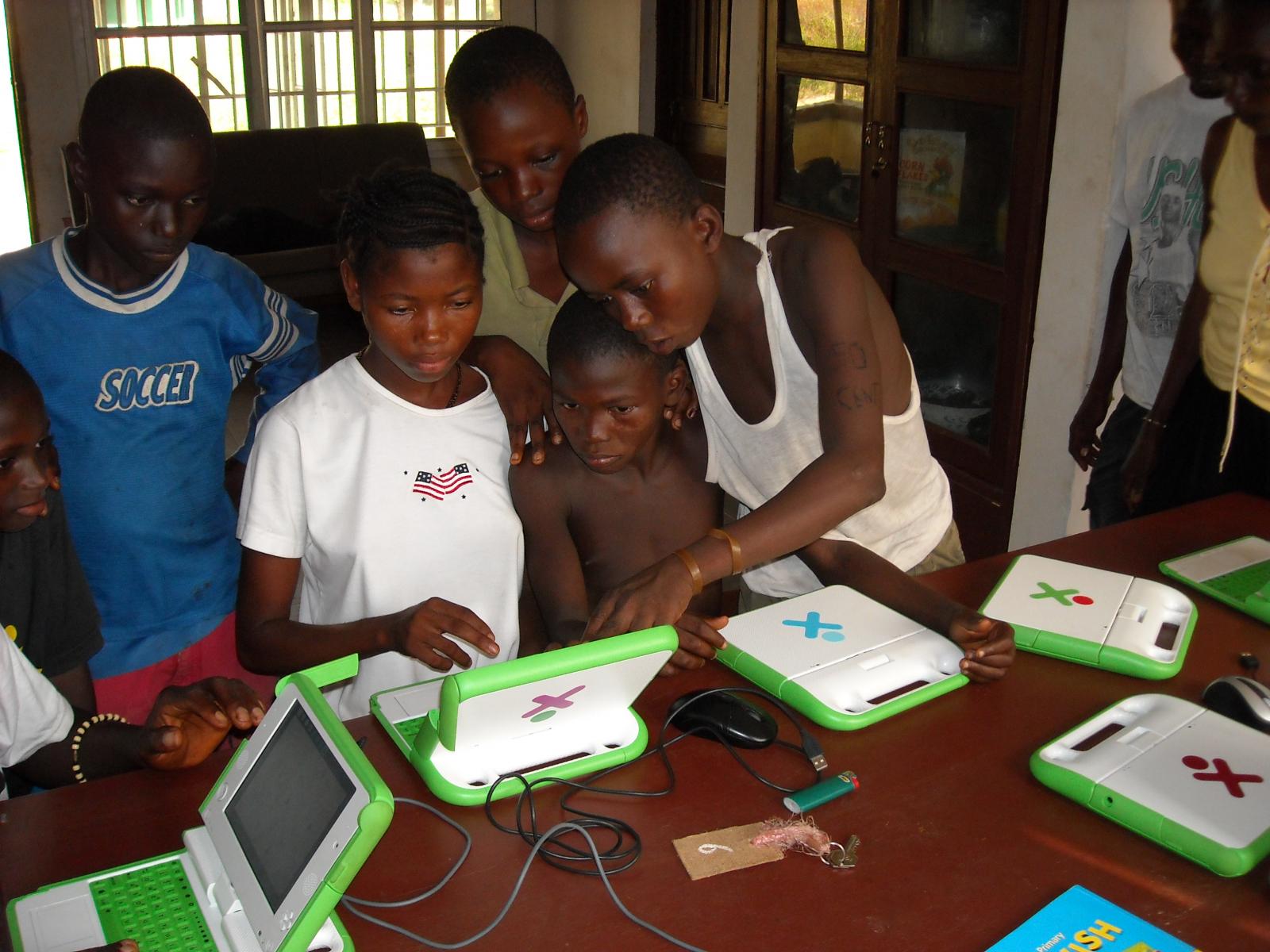

Technology has done so much to further education. It is used in almost every classroom around the world almost every day. As a teacher I want to incorporate technology into my classroom as much as possible. The benefits to me far out weigh and negative effects technology could have. Technology will aid in my instruction, serve as a way to assess my students knowledge, and help motivate and engage my students. I want to help further my students knowledge as much as possible and I think that helping them gain a knowledge of technology and how to use it will be very useful in their lives. Technology is changing everyday. My students will always be exposed to new technology and more than likely they will be asked to use it during their educational and eventually their professional lives. Knowledge of technology has helped me greatly in school and I'm learning new things every day. I hope to help my students understand the importance of technology and how it can benefit them just as I have learned how important it is in my life and the almost endless benefits that it offers me.
Friday, March 15, 2013
Resources For Future Classroom
Integrating technology will be an almost daily task in my future classroom. By keeping track of online resources that I find now I can refer back to them and use them in my classroom. I keep track of these online resources by bookmarking them on Diigo, or pinning them on Pinterest. I had the opportunity to explore some resources this past week and here is some of what I found.
http://en.childrenslibrary.org- This site is an online children's library. You can create your own library account and read books online. It also gives access to children's books from countries all around the world which will be great for integrating diversity in my classroom.
http://www.microsoft.com/education/en-us/teachers/guides/Pages/digital_storytelling.aspx- This website is all about digital story telling and provides access to software that allows student's to create their digital stories. I would really like to use this website to create a lesson where my student's write their own story and create a video or slide show to go with it. I will most likely use this website for my project in my education technology class.
http://kids.nationalgeographic.com/kids/- Who doesn't love National Geographic? I know I do! When I was in elementary school I loved looking at the National Geographic magazines that our teacher kept available to us. There were always interesting stories and pictures in it. This website is geared towards kids and provides games, pictures, and facts that can be used in a social studies lesson.
http://www.kidsolr.com- Out of all the websites I explored this week, this one is my favorite. It has hundreds of links to other webpages with topics from every subject. I especially loved the links for history and I know that I will definitely be using this site as a resource in my classroom.
www.easybib.com- This last website isn't really geared to my future 3rd grade classroom but it is a website that I love and has helped me so much through my college career and I may need it as a professional as well. Easybib is an online citation builder. You just type in the information you know and it builds your citation for you for free. Easy, free, and convenient.
There it is. Hopefully my library of resources will continue to build and benefit me throughout m career
-- Life-Long Learner
Thursday, February 28, 2013
Google in Education


I have been using Google ever since I first learned how to use the internet. I always knew that Google was the largest search engine in the world and any time I ever needed information I always turned to Google. Unfortunately though until the beginning of this semester I had no clue the extent of what Google had to offer me. Did you know that Google is more than just a search engine? I didn't. But boy do I know now. As a future educator Google has so much to offer me.
These are the top four resources that I think will benefit me most as a teacher.
- Gmail- Free email offered through Google that connects to other Google web services. As a teacher staying connected is important and I will be using email to keep in touch with my colleagues and the parents of my students.
- Drive- (I don't mean in a car) Google drive offers up to 5GB of free storage space on the internet. It also allows you to create documents, presentations, forms, drawings, and spreadsheets and store them. As an educator I can use Drive to store and create almost anything I need and it allows me to share whatever I want with others.
- Blogger- (Hint: I'm using it right now) blogger is a free weblog publishing tool that is provided by google. I can use Blogger as a way to share my ideas with others or to get ideas from others by following their blogs. I can also use it as a way to keep a personal journal of observations and reflections through out my teaching career.
- Google+- Google+ is the social networking site that is offered by Google and it makes sharing information even easier. It provides a way for me to stay connected with other teachers and I can post my blog or anything I create with Google Drive on my profile to share it with others.
Another great thing about google is that all of it's resources are connected. If you sign up for a free Gmail account you don't have to sign up to use Drive or Blogger or any other service. You automatically have those resources at your disposal after you sign up for Gmail. I think that Gmail is the most valuable service provided by Google because it connects me to all the other services.
Google also offers resources such as: Images, Earth, Calendar, YouTube, and Reader. All of these resources can be used in education and I plan on using them as an educator.
I've already had ideas of how I can use Google to benefit my teaching career. I can create quizzes and presentations using Google forms in Drive, use Reader to keep the educational blogs I follow in one spot, and use YouTube to help differentiate my instruction in the classroom.
Simply put...
I love Google! I can't say enough good things about it! With that being said, I am still learning about all that Google has to offer me and how I can use it in my profession but so far I am very impressed and satisfied with all the services that Google offers me.
Here is great blog I found that has links to guides for every Google service. So if you ever aren't sure how to work a Google service or what you can use it for just look it up in this guide. http://googleservicesguide.blogspot.com
Or Google it!
-- Life-Long Learner
Monday, February 4, 2013
Presentations.. Keep It Simple
Presentations are used in almost every field of work. They are a great way to really drive a point home. As an educator I will be using presentations regularly to teach so learning how to build an effective presentation will be an important skill for me to learn.
I didn't realize how there are different structures for presentations until I read 5 Quick Ways to Structure a Presentation by Nick Morgan. This article gave 5 simple structures that can be used for almost any presentation on any subject. I also greatly benefited from the article Top Ten Slide Tips by Garr Reynolds. I completely agreed with everything he said in his article. I have sat through some very boring presentations in my life but I have also sat through some very interesting presentations and the interesting presentations followed most of Reynolds tips. While I was researching information on presentations I found this article which is similar to Reynolds article but it gives a little bit different perspective on some of the tips and more advice on how to build a great presentation. I also found an article by Meryl K. Evans that had links to several great presentations that I can use as inspiration when I am building presentations. Another website that is great for building presentations is Prezi.com. It gives people a new way to present information and is more interactive than a regular Powerpoint. As a teacher I would like to try and utilize prezi because I think it would be more engaging for children at the elementary level.
When I prepare presentations for my classroom or other activities I will make sure to keep it simple, make it visually stimulating, limit texts, and make sure it is interesting and applicable to my students and the topic I'm teaching. Children don't always have long attention spans. Actually most adults don't even have long attention spans so keeping these key principles in mind will help keep my students attention and keep them engaged in my lessons.
--Life-Long Learner
I didn't realize how there are different structures for presentations until I read 5 Quick Ways to Structure a Presentation by Nick Morgan. This article gave 5 simple structures that can be used for almost any presentation on any subject. I also greatly benefited from the article Top Ten Slide Tips by Garr Reynolds. I completely agreed with everything he said in his article. I have sat through some very boring presentations in my life but I have also sat through some very interesting presentations and the interesting presentations followed most of Reynolds tips. While I was researching information on presentations I found this article which is similar to Reynolds article but it gives a little bit different perspective on some of the tips and more advice on how to build a great presentation. I also found an article by Meryl K. Evans that had links to several great presentations that I can use as inspiration when I am building presentations. Another website that is great for building presentations is Prezi.com. It gives people a new way to present information and is more interactive than a regular Powerpoint. As a teacher I would like to try and utilize prezi because I think it would be more engaging for children at the elementary level.
When I prepare presentations for my classroom or other activities I will make sure to keep it simple, make it visually stimulating, limit texts, and make sure it is interesting and applicable to my students and the topic I'm teaching. Children don't always have long attention spans. Actually most adults don't even have long attention spans so keeping these key principles in mind will help keep my students attention and keep them engaged in my lessons.
--Life-Long Learner
Saturday, February 2, 2013
Images in Education

Images are a great resource that can be used in classrooms today. One of the great things about using images in the classroom is that it can be used for all ages. It can be used as an introduction to a specific topic or a teacher could show a picture of a historical figure that the student's are learning about or it can illustrate a key concept that the teacher is trying to get across. When I was in Kindergarten our assignment for every letter we learned was to find pictures in magazines at home that started with that specific letter and cut them out and glue them onto a page. This is a great example of how images can be used in the classroom. Now with digital cameras much more can be done because digital images can be taken and be uploaded instantly and used in the classroom. This article, 100 Ways to Use Digital Cameras is a resource that I think will be very useful for me as a future educator. It lists 100 different ways that you can utilize digital cameras in your classroom. I thought that all these ideas are good suggestions and the fact that there are 100 suggestions gives you a variety of choices. I also found this wiki page through Pinterest that gives suggestions for how to use media in the classroom. It has links for images and videos and gives suggestions for how to use them in the classroom for different grades. The image I used for this blog post I found by using the creative commons search engine and I found it on pixabay.com which is a great website for images that are available for use in your classroom under the creative commons license. I plan to use images in my classroom so I feel like these resources will be very useful to me.

--Life-Long Learner
Saturday, January 26, 2013
Internet Safety
Most students these days have access to an infinite amount of
information. They carry this information with them everywhere and with a
touch of their finger they can pull up any information they want. The
use of internet on students mobile devices gives students a great
advantage if used appropriately but it can also be very dangerous. All students should be aware of safe internet practices. When I was in high school I remember having a whole segment on internet safety in my health class. Before that time I didn't know how dangerous the internet could be and how much personal information there is about me on the internet. As I browsed through some websites about internet safety and awareness this past week I was again reminded about how much of my personal life is on the internet. It was a sort of wake up call. After being reminded of the dangers in the internet I immediately changed some of the information about myself on my Facebook profile because a lot of it was way too personal. I also didn't think about how the things I post on social networking sites could effect my future. Many employers look at those sites to find out the type of person you are and how you present yourself. I haven't had time to do it yet but I am going to search through my posts and make sure that all content I have posted in the past is appropriate. This website Net Safe Utah was the website that I found most beneficial for information about staying safe on the web. The site has an easy to follow layout with topics for children, teens, parents, educators, and trainers. Anyone, at any age, who visits this site will find it easy to access the topics they want. It provides videos and links to other pages that are also dedicated to safe internet practices. It was especially helpful to me because Utah is one of the states that I might possibly teach in. Knowledge of internet safety is of vital importance to students and parents because of how often it is used in our daily lives. The internet is an an amazing tool that we are lucky to have access to and when we use it appropriately our resources are endless.
--Life-Long Learner
--Life-Long Learner
Don't be a Teenage Criminal
It is 11 in the morning and I have been awake for a few hours and I have already sent about 20 text messages, updated my Facebook status, called my mom, made a comment on Instagram, and sent a picture message to a friend. Most students these days have access to these modes of communication and social networking and they are a great way to stay connected when used appropriately. Sadly not all students use these tools properly. The issue that worries me most is that of students sending inappropriate pictures to each other. When I was in the the 10th grade there was a big upheaval in my school. The head cheerleader, a beautiful, smart, senior girl had sent a picture of herself naked to her boyfriend from her phone. They had a big fight and he sent to picture to some of his friends. His friends then sent it almost every other guy in our school district. There is no telling how many people it was eventually sent to and it may still be somewhere on the internet or on someones phone. This devastated the girl. She didn't come back to school for two weeks and even when she did come back she was different. Her parents pressed charges on her ex-boyfriend. I don't know what he was convicted for the crime but if he was, he could've possibly faced jail time and would've been forced to register as a sex-offender because she was underage. If he had been convicted it could've affected the rest of his life. I can't even imagine how everyone involved in the situation felt. I would never want to have to deal with that as an educator or parent and definitely not as a victim. I think it is very important for students to know that sending explicit pictures of themselves or others is against the law while they are underage. Even though in my opinion it is wrong at any age. I think there a many students that aren't aware that this act is against the law. I hope to be able to aid in raising awareness about this danger in schools, especially in the school that I end up teaching in.
Here is an interesting article I read about this topic. Young teenagers 'turned into criminals by sex texts'
-- Life-Long Learner
Here is an interesting article I read about this topic. Young teenagers 'turned into criminals by sex texts'
-- Life-Long Learner
Saturday, January 19, 2013
I get by with a little help from my.... PLN
I was just recently introduced to the idea of a Personal Learning Network (PLN). I know that technology is vital to education in the world we live in and I know how important it is to have as many resources as possible, but I had no clue how to organize and find all these resources. That has changed since I now know about PLN's and how to establish one. I'm working now to build my own PLN through tools available to me on Google, Pinterest, and Diigo.
So far I have found some very interesting resources that are relevant to my teaching career but the one I found the most interesting and useful I found while browsing the Education category on Pinterest. It is an article about over 30 educational technology guides. The article has guides for almost any technology you can think of that can be used in the classroom. It explains the best ways you can use technology in your classroom and guides you through how to use these resources. I referred to the guide on blogs recently when I had a question about my blog. I have a feeling this article will be a HUGE reference for me while I am establishing my PLN.
Here is the article. Enjoy.
http://www.educatorstechnology.com/2012/08/teacher-educational-technology-guides.html
--Life Long Learner
So far I have found some very interesting resources that are relevant to my teaching career but the one I found the most interesting and useful I found while browsing the Education category on Pinterest. It is an article about over 30 educational technology guides. The article has guides for almost any technology you can think of that can be used in the classroom. It explains the best ways you can use technology in your classroom and guides you through how to use these resources. I referred to the guide on blogs recently when I had a question about my blog. I have a feeling this article will be a HUGE reference for me while I am establishing my PLN.
Here is the article. Enjoy.
http://www.educatorstechnology.com/2012/08/teacher-educational-technology-guides.html
--Life Long Learner
My Inspiration and Mentor
There were a lot of factors that effected my decision to become a teacher, but one of my main influences was my father. My father has taught History and Spanish on the high school level for twenty years now. He knew that teaching was his calling and he decided to pursue it even though he knew it wouldn't make him rich. When asked about it he says, "As a teacher I have made enough money to provide for my family. We may not live lavishly but we have always been okay, and as a teacher I have had a plenty of opportunity to spend quality time with my family." My father is an inspiring man. When I decided that teaching was the career path I wanted to take my father was the first person I turned to for advice. He has helped me with everything from recommending universities, to online sites to help me study for my Praxis exam. Some people have asked me why I would ever want to be a teacher because they don't make any money but my dad never said anything like that. He has only ever encouraged me to pursue my dream.
I think it is so important for people in any profession to have a role model/mentor. It is a comfort knowing that when I have questions or concerns I have someone trustworthy to turn to for advice. I was just lucky enough to have my father as my mentor.

My Mom and Dad aka My Inspiration
Here are some websites that my father recommended for me to register and practice for the Praxis.
Registering
Practice Test
Practice Test
--Life Long Learner
Friday, January 11, 2013
Technology: The Present and Future of Education
As my education has progressed through the years technology has been integrated into my course work more and more frequently. Now, as a college student, technology is used in every class that I am enrolled in. Technology plays an important role in education today and it's importance can only continue to grow with all of the advances that are made in technology every day. Many people in today's cyber age are very technologically advance. I am not ashamed to admit that I am NOT one of those people. When it comes to technology I am far behind the times. As a future educator I consider technology a key to successful teaching. It is my goal to become proficient in the use of technology because I know it will not only help in my teaching career but also in every other area of my life. Right now I am taking a technology for education course at Brigham Young University Hawaii and this course is a way for me to learn as much as I can about technology in the classroom and how I can implement it in my lessons or my own personal studies. I know by the end of the course I won't be a master of technology but hopefully I can at least achieve squire status and I can build upon my acquired skills to maybe one day reach master status.
-- Life-long Learner
-- Life-long Learner
Subscribe to:
Posts (Atom)